Pages

Saturday, April 4, 2015

The One Looking Back and Moving Forward!

Spring Break is nearly over…but not yet!

In honor of my fun week off I thought I’d share a little of my non-teacher Colorado life. As well as a look forward to a new and exciting addition to the classroom after break.

The first part of my break a great friend from my hometown came out to visit! I always love being a tourist with friends and taking in all of Colorado’s beauty! We spent our time relaxing and hiking in Vail, touring Coors Brewery in Golden, and showing off my amaaaazing city...Denver! 


Later in the week my teacher besties (and real world besties) took a trip to the far southwest side of Colorado and saw the sand dunes! They were beautiful and I forgot we were in Colorado. Unfortunately, the winds were NOT forgettable. It was almost impossible to see, walk, and most importantly sand surf! We did get some great pics so we’ll mark it as a win. 


As I mourn the final days of break I am also excited for a new addition to our classroom routine! After months and months of researching and planning we are starting a classroom twitter account!

I love tweeting about our happenings in room 21 already and I’m excited to bring the kids on board! (@elephanteducate if you are on twitter too – which you should be!) 

https://twitter.com/ElephantEducate


To start, I obviously had to put together a new bulletin board to get me the kids excited before break. 

When we get back to school students will learn a quick overview of twitter. I’ll show them a peak at what twitter can do! For the first few weeks we will focus on tweeting about STEM and our cardboard projects. I want to start off small and specific so we can hopefully have great conversation. 

To make life a little easier I made "tweet sheets" that students will use to write out a tweet before it is sent. Those tweets will also be found on the board shown above. (I will approve all tweets and to start I will also submit them to our twitter...in the future students may use our iPads to submit tweets)

My tweet sheets are found FREE on TpT now! 

https://www.teacherspayteachers.com/Product/Twitter-Response-Form-1796011
 

Check out @Room21Tweets for all the trending topics from our classroom!

Twitter in the classroom is nothing new, I’ve been watching other classroom twitter accounts, reading techy teacher’s blogs, and pinning everything useful.  

Here are some great people I’ve learned from:


First, Kayla Deltz - she is a true tech teacher who inspires me often! You can find her on twitter, blogging, and the MOST exciting in my opinion is you can find her students on twitter here!


In this article, Two Guys and some iPads have shared how they use twitter to build digital citizenship. They also show how students can share their thoughts to build relationships in the classroom.


Here is a great video on how Karen Lirenman started to use twitter with her 2nd graders and how it took off! Quick and easy way to get great tips!


And finally, if you still need more convincing, here are 28 ways to incorporate twitter into your classroom!


I hope this gives you some inspiration to use twitter in your classroom as well!


Wednesday, March 25, 2015

The Giant One with Math Centers


Blame it on the week before Spring Break or blame it on Spirit Week (dress up days) or blame on my March Madness heartache…it’s been a long week! And it’s only Wednesday! 

I’m sure you’ve felt that way before so I decided to share my *almost* fool proof math block and math centers! Just a little bit of positivity and some ideas on this Wednesday! 

First, my math centers continue to be an ever-evolving process but for the most part they boil down to 6 types of rotations.


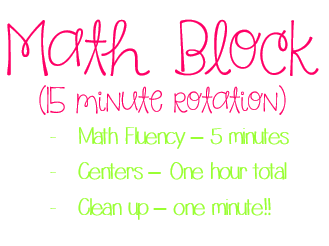
We only ever do four types a day and usually stick to those four the whole week. Our schedule for math block goes one of two ways:


Math fluency is a quick review of either multiplication or division facts, Problem of the Day comes from CCSS in our current district interim cycle, and Whole Group comes from our school-wide curriculum, Math in Focus.

Math Centers takes all of that and piles it into one!

If you’re a person who doesn’t do math centers I highly encourage you to try! Fair Warning: I love all centers everything. BUT STILL! They are great and I will share with you why J

First the logistics (this is both necessary for your sanity and for their learning)
Each rotation was at least introduced whole group twice before becoming a center. Introduced as in I explain, have a small group show quickly, and we try it from there. Sometimes this does bite me in the youknowwhere but for the most part it works and saves time! 

Most importantly, our PowerPoint is on a timed rotation and chimes when it rotates. This is SO necessary for me because if there wasn’t a sound I would have 23 kids yelling at me the picture changed and I would still be teaching!

This is also where I show what iPad app or Computer program to use. I tell them at the beginning but it’s a needed reminder.


I’m long winded sometimes so the best way to explain my rotations is with pictures!

Seat Work
Admittedly the most “boring” of my centers but holds students accountable for the whole group learning of the day. Students cannot rotate until seat work is done (designed to only take the time allowed) they also must fix their answers from the day before at recess (really only necessary the first few days to set accountability.) 


If they finish Seat Work early they know to immediately start a Today's Number. It’s allowed me to always have students learning!


Partner Game
This is the most versatile center (like how I say that over wishy-washy?) Games vary from Scoot, to multiplication war, to this week – white board challenge – all of our review problems cut up and put in a basket. It’s funny how the same problems can be done in seat work but add a white board and tally marks and it’s a competition! 


Work With Teacher
This is a differentiated lesson based on the day’s whole group lesson or on students’ target skills. I always like to start with my most struggling group (hippos) and work my way to the more advanced (toucans) so they get more instruction before seat work.

Interactive Notebooks
I previously wrote about those here, so I won’t go into anymore detail except the kids still LOVE them and I am still indebted to Not So Wimpy Teacher for all her hard work making these resources!

iPads
I’ve also shared my love for certain apps previously and you can check it out here! Lately we’ve been doing SplashMath a lot because I finally splurged for the full access account. Students also love Penguin Math to review facts. 

Computers
We used to do a lot of SumDog and other random skill sites (which I’m still a fan of) but lately I’ve been trying Edmodo in math. I’m really loving everything about Edmodo except my student usernames! With so many students on Edmodo our usernames look something like a computer code and you can only imagine how many times it takes to get it right! 


I love the Snap Shot feature! This allows me to pick and choose CCSS to quiz students on. Edmodo creates randomized quizzes for these CCSS and provides me with amazing data after! You get 5 free snapshots a month so use wisely! I think I’ll do one a week once we get in a groove. 

Beyond the snapshot I can create and send quizzes, (whole group or personalized) take polls, and send discussion questions.

Here’s a “snap shot” of Edmodo Snap Shot!


I hope this post gave you a few ideas on how to start Math Centers – if you use math centers I’d love to hear your expertise as well!

Friday, March 20, 2015

The One When the Panthers Win!


March Madness started a few days ago but today was the first *real* day because UNI played!! Yay! I decided I just HAD to find a way that I, I mean my kids, could watch it. 


I searched TpT and googled “educational ways to watch March Madness” and ya know? Nothing showed up. Surprising, I know. So instead I incorporated our focus skill in math currently: created and interpreting graphs. 

In room 21, we graphed how many points each UNI player scored. Don’t get too jealous – we only watched the last ten minutes, but it was so fun! I had a few “We’re not graphing the players for Wyoming?” – Um no, we cheer for the purple and gold.


Just kidding. I let them cheer for whoever they wanted. As I’ve mentioned we are studying universities in writing, and one student researched Wyoming so she (and a nice, loyal friend) cheered on Cowboy Joe.

During the game we tallied each point scored (free throws and field goals were new to some of us) and during commercial breaks we played “around the world” in table groups. It was a fun little break after a week of state testing - and on a Friday afternoon you can’t beat it! After we created bar graphs. It’s safe to say Westpun is everyone’s new favorite player.


Even though Google didn’t give me much I did hear, “Wow, this is fun and I’m also learning! Did you know that would happen Ms. Buikema?” To be honest, the words came from my class ham but it’s always nice to hear ;)

Next up – Louisville! When they asked if we could do this for the next game they were disappointed it was on a Sunday…so I sent them home with graphing paper. Turns out Colorado is a PANTHER STATE too!